Fujifilm Fuji Finepix S7000 Service Manual +Troubleshooting Guide
What's Included?
Lifetime Access
Fast Download Speeds
Offline Viewing
Access Contents & Bookmarks
Full Search Facility
Print one or all pages of your manual
DIGITAL CAMERA FinePix S7000 TROUBLESHOOTING GUIDE US/CA/EU/EG/GE/AS-Model WARNING THE COMPONENTS IDENTIFIED BY THE MARK “ ” ON THE SCHEMATIC DIAGRAM AND IN THE PARTS LIST ARE CRITICAL FOR SAFETY. PLEASE REPLACE ONLY BY THE COMPONENTS SPECIFIED ON THE SCHEMATIC DIAGRAM AND IN THE PARTS LIST. IF YOU USE PARTS NOT SPECIFIED, IT MAY RESULT IN A FIRE AND AN ELECTRICAL SHOCK. Ref.No.: ZM00521-400 FUJI PHOTO FILM CO., LTD. Printed in Japan 2005. 01
FinePix S7000 TROUBLESHOOTING GUIDE SAFETY CHECK-OUT After correcting the original problem, perform the following safety check before return the product to the customer. 7. RISK OF FIRE- REPLACE FUSE AS MARKED 2.5A 125V 2.5A 125V CAUTION: FOR CONTINUED PROTECTION AGAINST FIRE HAZARD, REPLACE ONLY WITH SAME TYPE 2.5 AMPERES 125V FUSE. ATTENTION: AFIN D'ASSURER UNE PROTECTION PERMANENTE CONTRE LES RISQUES D'INCENDIE, REMPLACER UNIQUEMENT PAR UN FUSIBLE DE MEME, TYPE 2.5 AMPERES, 125 VOLTS. 1. Check the area of your repair for unsoldered or poorly soldered connections. Check the entire board surface for solder splasher and bridges. 2. Check the interboard wiring to ensure that no wires are “pinched” or contact high-wattage resistors. 3. Look for unauthorized replacement parts, particularly transistors, that were installed during a previous repair. Point them out to the customer and recommend their replacement. 4. Look for parts which, though functioning, show obvious signs of deterioration. Point them out to the customer and recommend their replacement. 5. Check the B + voltage to see it is at the values specified. 6. Make leakage - current measurements to determine that exposed parts are acceptably insulated from the supply circuit before returning the product to the customer. 8. WARNING! HIGH VOLTAGE WARNING: TO REDUCE THE ELECTRIC SHOCK, BE CAREFUL TO TOUCH THE PARTS. 2
FinePix S7000 TROUBLESHOOTING GUIDE TABLE CONTENTS 1. Lens............................................................................................................................ 4 1-1. Dust inside the lens .................................................................................................................... 4 1-2. Lens soiling ................................................................................................................................ 4 1-3. Cosmetic ring on the lens displaced .......................................................................................... 5 1-4. Zoom error ................................................................................................................................. 5 1-5. Noise when the camera is shaken (with the camera switched on and the lens extended) ........ 5 1-6. Lens fails to retract (focusing error) ........................................................................................... 6 1-7. Lens fails to extend .................................................................................................................... 6 2. Image.......................................................................................................................... 7 2-1. Incorrect color tones................................................................................................................... 7 2-2. Horizontal lines across the top of recorded images ................................................................... 7 3. Power ......................................................................................................................... 8 3-1. The camera freezes after being turned on and cannot be turned off ......................................... 8 3-2. The camera will not turn on (using either the AC adapter or batteries)...................................... 8 3-3. The camera will not turn on (using either the AC adapter or batteries)...................................... 8 4. Ohter .......................................................................................................................... 9 4-1. Card recognition failure .............................................................................................................. 9 4-2. Displaced power switch.............................................................................................................. 9 3
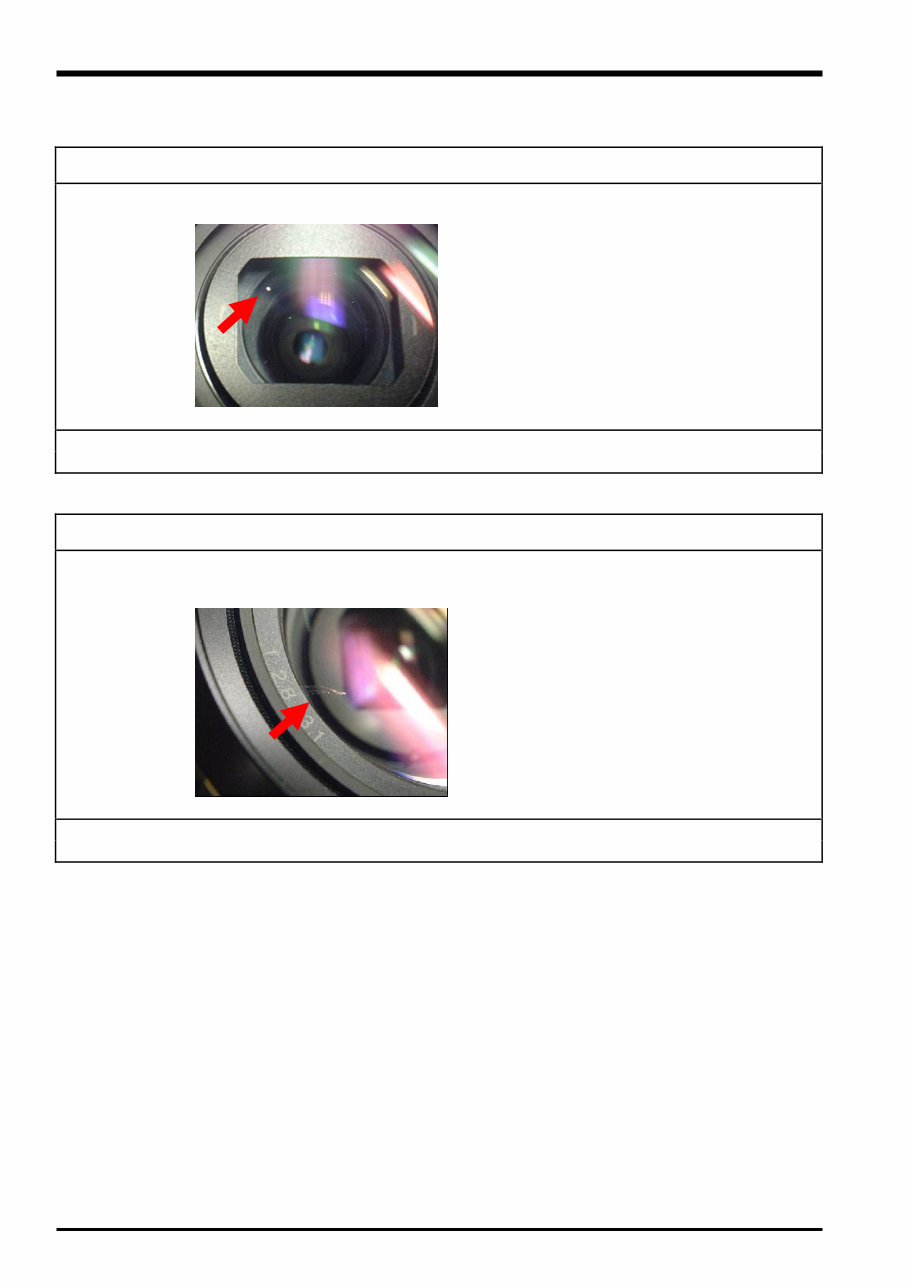
FinePix S7000 TROUBLESHOOTING GUIDE 1. Lens 1-1. Dust inside the lens Fault details: There are several white dust flecks inside the lens. Analysis results: Dust inside the lens barrel has worked its way out. Repair details: Replace the LENS CONST (M209, BU02933-100). 1-2. Lens soiling Fault details: Lens soiling (on the surface). Analysis results: In the lens manufacturing process, the solvent used for locking the screws following G1 lens adjustment and to prevent removal of the cosmetic panel has adhered to the lens. Repair details: Replace the LENS CONST (M209, BU02933-100). 4
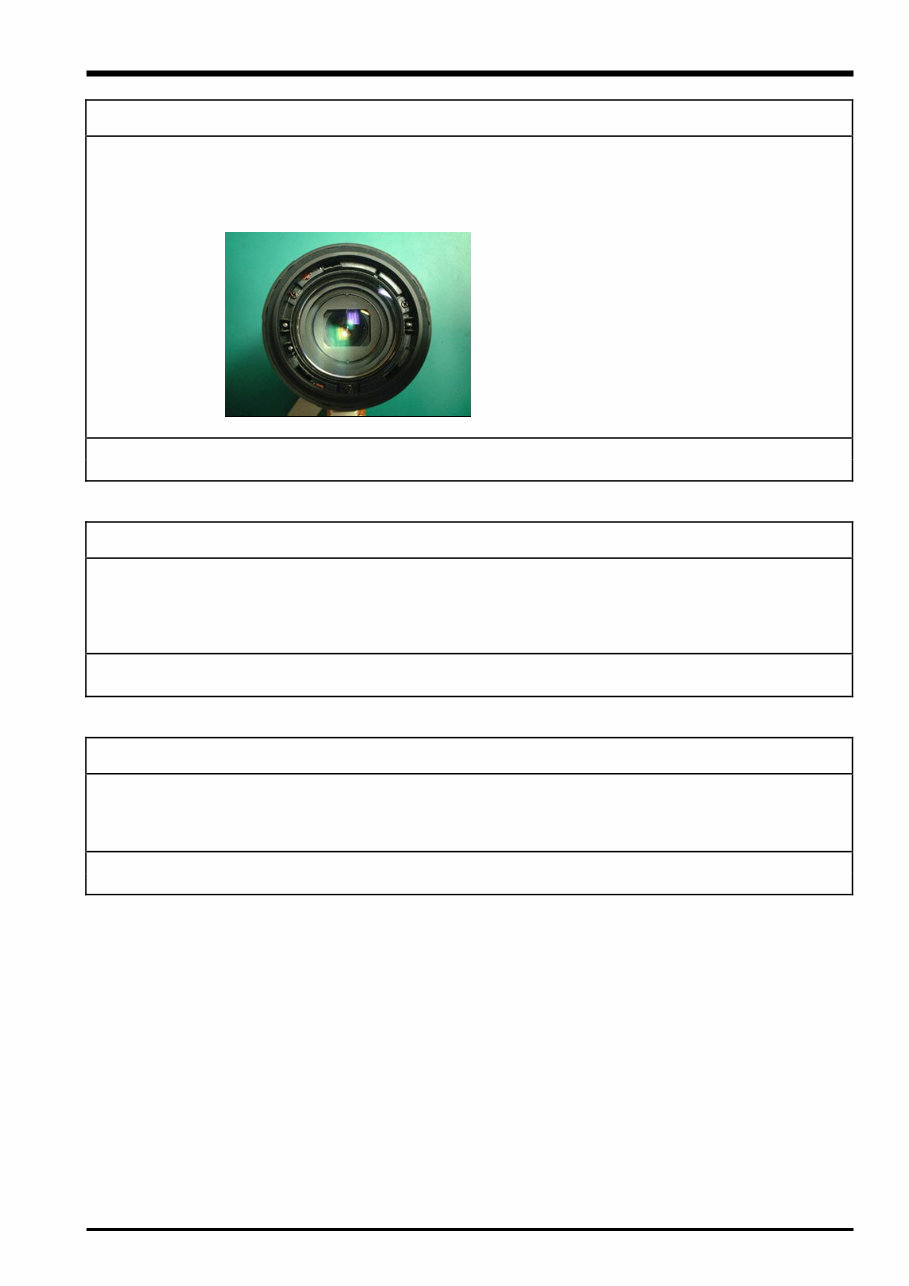
FinePix S7000 TROUBLESHOOTING GUIDE 1-3. Cosmetic ring on the lens displaced Fault details: The cosmetic ring on the lens has fallen off. Traces of the adhesive remain on the frame on the lens (red, in 2 locations) Analysis results: The cosmetic ring is a push-fit type (clicks into place) and is constructed to be difficult to remove even if the adhesive fails. The ring must have been pulled off by an external force of some sort. Repair details: Replace the LENS CONST (M209, BU02933-100). 1-4. Zoom error Fault details: Zoom operation is slow and uneven and a zooming error is frequently displayed. Analysis results: The rated current is outside the specified range and checking of the disassembled lens showed that friction between lens components due to excessively frequent use has caused wear on adjoining parts that affects lens movement. Repair details: Replace the LENS CONST (M209, BU02933-100). 1-5. Noise when the camera is shaken (with the camera switched on and the lens extended) Fault details: The camera makes a noise when it is shaken (with the camera switched on and the lens extended). Analysis results: Missing retaining component in the intermediate lens barrel (assembly error). Repair details: Replace the LENS CONST (M209, BU02933-100). 5
Are you experiencing issues with your Fujifilm S7000 Camera? Why spend a fortune on repairs or replacements when you can easily handle it yourself? This comprehensive service and repair manual is the same one utilized by the Official Certified Fujifilm Technicians, providing you with the necessary guidance to troubleshoot and fix your camera.
Within this manual, you will gain insights into safety precautions, product specifications, troubleshooting, maintenance, disassembly and reassembly, adjustments, system diagrams, exploded views, and a replacement parts list. Both service manuals are meticulously detailed, featuring images and step-by-step instructions for the most effective camera repair and servicing methods.
It's important to note that this is the official service and repair manual in PDF format, ensuring high resolution and exceptional print quality for the pages you require. With instant access upon payment, there are no shipping fees or waiting for postal delivery, allowing you to commence your repairs promptly.
Specifications:
Language: English
Files: Service Manual + Troubleshooting Manual
Pages: 136
Platform: Windows and MAC
If you are in search of a specific service manual that seems elusive, feel free to reach out to us with your request. With one of the most extensive service manual databases available, there's a good chance we can assist you!
Recently Viewed
5,521,897Happy Clients
2,594,462eManuals
1,120,453Trusted Sellers
15Years in Business
Price:
Actual Price:
Fujifilm Fuji Finepix S7000 Service Manual +Troubleshooting Guide




 Lifetime Access