


2004 Cadillac XLR Owners Manual
What's Included?
 Lifetime Access
Fast Download Speeds
Online & Offline Access
Access PDF Contents & Bookmarks
Full Search Facility
Print one or all pages of your manual

Seats and Restraint Systems ........................... 1-1
Front Seats ............................................... 1-2
Safety Belts .............................................. 1-4
Child Restraints ....................................... 1-18
Air Bag Systems ...................................... 1-36
Restraint System Check ............................ 1-48
Features and Controls ..................................... 2-1
Keys ........................................................ 2-2
Doors and Locks ....................................... 2-8
Windows ................................................. 2-14
Theft-Deterrent Systems ............................ 2-17
Starting and Operating Your Vehicle ........... 2-19
Mirrors .................................................... 2-33
OnStar
®
System ...................................... 2-35
HomeLink
®
Transmitter ............................. 2-37
Storage Areas ......................................... 2-41
Retractable Hardtop .................................. 2-44
Vehicle Personalization ............................. 2-53
Instrument Panel ............................................. 3-1
Instrument Panel Overview .......................... 3-4
Climate Controls ...................................... 3-35
Warning Lights, Gages and Indicators ......... 3-41
Driver Information Center (DIC) .................... 3-57
Trip Computer ......................................... 3-72
Audio System(s) ....................................... 3-72
Driving Your Vehicle ....................................... 4-1
Your Driving, the Road, and Your Vehicle ..... 4-2
Towing ................................................... 4-32
Service and Appearance Care .......................... 5-1
Service ..................................................... 5-3
Fuel ......................................................... 5-4
Checking Things Under the Hood ............... 5-10
Rear Axle ............................................... 5-45
Headlamp Aiming ..................................... 5-46
Bulb Replacement .................................... 5-49
Windshield Wiper Blade Replacement ......... 5-49
Tires ...................................................... 5-50
Appearance Care ..................................... 5-75
Vehicle Identification ................................. 5-83
Electrical System ...................................... 5-84
Capacities and Specifications ..................... 5-91
Maintenance Schedule ..................................... 6-1
Maintenance Schedule ................................ 6-2
Customer Assistance Information .................... 7-1
Customer Assistance Information .................. 7-2
Reporting Safety Defects ........................... 7-10
Index ................................................................ 1
2004 Cadillac XLR Owner Manual M
GENERAL MOTORS, GM, the GM Emblem, CADILLAC,
the CADILLAC Crest & Wreath are registered
trademarks and the name XLR is a trademark of
General Motors Corporation.
This manual includes the latest information at the time it
was printed. We reserve the right to make changes
after that time without further notice. For vehicles first
sold in Canada, substitute the name “General Motors of
Canada Limited” for Cadillac Motor Car Division
whenever it appears in this manual.
Please keep this manual in your vehicle, so it will be
there if you ever need it when you’re on the road. If you
sell the vehicle, please leave this manual in it so the
new owner can use it.
Canadian Owners
You can obtain a French copy of this manual from your
dealer or from:
Helm, Incorporated
P.O. Box 07130
Detroit, MI 48207
How to Use This Manual
Many people read their owner’s manual from beginning
to end when they first receive their new vehicle. If
you do this, it will help you learn about the features and
controls for your vehicle. In this manual, you will find
that pictures and words work together to explain things.
Index
A good place to look for what you need is the Index in
back of the manual. It is an alphabetical list of what
is in the manual, and the page number where you will
find it.
Litho in U.S.A.
Part No. 10327354 A First Edition
©
Copyright General Motors Corporation 06/02/03
All Rights Reserved
ii
Safety Warnings and Symbols
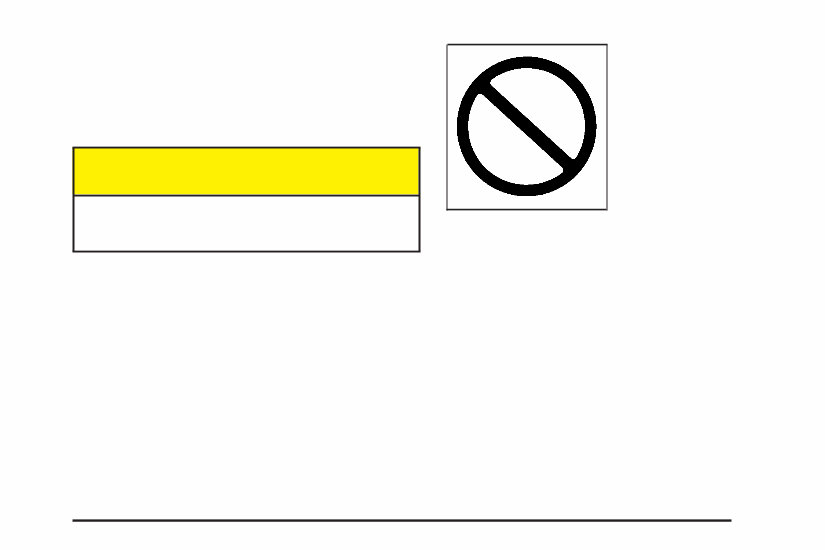
You will find a number of safety cautions in this book.
We use a box and the word CAUTION to tell you about
things that could hurt you if you were to ignore the
warning.
{CAUTION:
These mean there is something that could hurt
you or other people.
In the caution area, we tell you what the hazard is.
Then we tell you what to do to help avoid or reduce the
hazard. Please read these cautions. If you don’t, you
or others could be hurt.
You will also find a circle
with a slash through it in
this book. This safety
symbol means “Don’t,”
“Don’t do this” or “Don’t let
this happen.”
iii

Vehicle Damage Warnings
Also, in this book you will find these notices:
Notice: These mean there is something that could
damage your vehicle.
A notice will tell you about something that can damage
your vehicle. Many times, this damage would not be
covered by your warranty, and it could be costly.
But the notice will tell you what to do to help avoid
the damage.
When you read other manuals, you might see
CAUTION and NOTICE warnings in different
colors or in different words.
You’ll also see warning labels on your vehicle.
They use the same words, CAUTION or NOTICE.
Vehicle Symbols
Your vehicle has components and labels that use
symbols instead of text. Symbols, used on your vehicle,
are shown along with the text describing the operation
or information relating to a specific component, control,
message, gage or indicator.
If you need help figuring out a specific name of a
component, gage or indicator, reference the following
topics:
• Seats and Restraint Systems in Section 1
• Features and Controls in Section 2
• Instrument Panel Overview in Section 3
• Climate Controls in Section 3
• Warning Lights, Gages and Indicators in Section 3
• Audio System(s) in Section 3
• Engine Compartment Overview in Section 5
iv
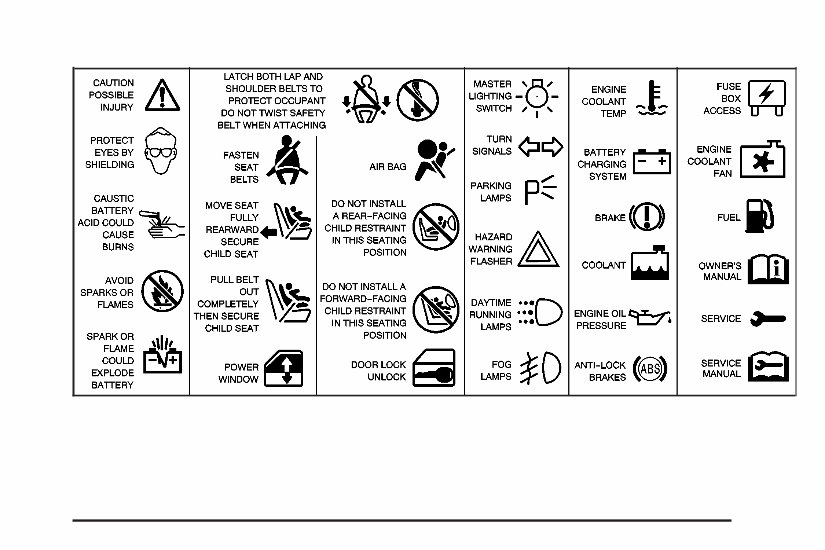
These are some examples of vehicle symbols you may find on your vehicle:
v

✍ NOTES
vi

Front Seats ......................................................1-2
Eight-Way Power Seats ...................................1-2
Power Lumbar ...............................................1-3
Heated and Cooled Seats ................................1-3
Safety Belts .....................................................1-4
Safety Belts: They Are for Everyone .................1-4
Questions and Answers About Safety Belts ........1-8
How to Wear Safety Belts Properly ...................1-9
Driver Position ..............................................1-10
Safety Belt Use During Pregnancy ..................1-16
Passenger Position .......................................1-17
Safety Belt Pretensioners ...............................1-17
Safety Belt Extender .....................................1-17
Child Restraints .............................................1-18
Older Children ..............................................1-18
Infants and Young Children ............................1-20
Child Restraint Systems .................................1-23
Top Strap ....................................................1-27
Lower Anchorages and Top Tethers for
Children (LATCH System) ...........................1-27
Securing a Child Restraint Designed for the
LATCH System .........................................1-29
Securing a Child Restraint in the Passenger
Seat Position ............................................1-31
Air Bag Systems ............................................1-36
Where Are the Air Bags? ...............................1-38
When Should an Air Bag Inflate? ....................1-41
What Makes an Air Bag Inflate? .....................1-42
How Does an Air Bag Restrain? .....................1-42
What Will You See After an Air
Bag Inflates? ............................................1-42
Air Bag Off Switch ........................................1-44
Servicing Your Air Bag-Equipped Vehicle .........1-48
Restraint System Check ..................................1-48
Checking Your Restraint Systems ...................1-48
Replacing Restraint System Parts After
a Crash ...................................................1-49
Section 1 Seats and Restraint Systems
1-1
Front Seats
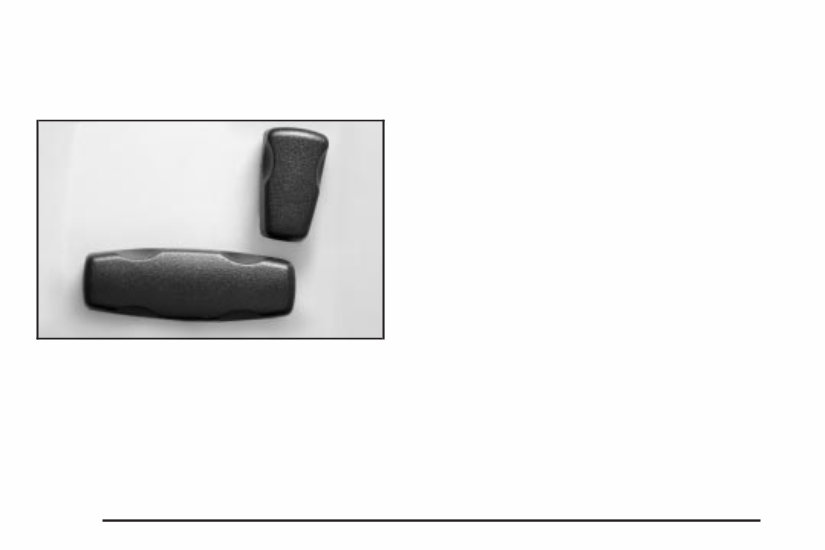
Eight-Way Power Seats
The eight-way power seat controls are located on
the outboard sides of both the driver’s and the
passenger’s seats.
• Move the front of the control up or down to adjust
the front portion of the cushion up or down.
• Move the rear of the control up or down to adjust
the rear portion of the cushion up or down.
• Lift up or push down on the whole control to move
the entire seat up or down.
• Slide the control toward the front or rear of the
vehicle to move the whole seat forward or rearward.
• Push or pull the top of the control forward or
rearward to raise and recline the seatback.
1-2
Power Lumbar
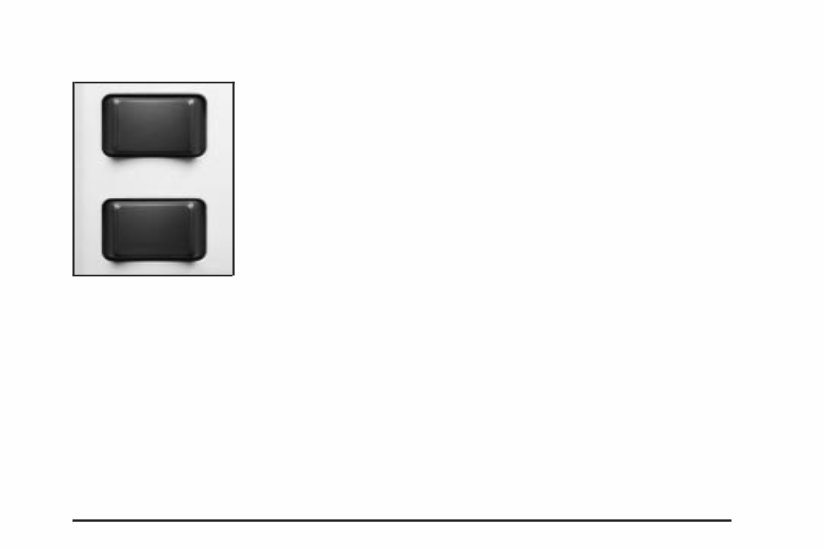
The driver’s and
passenger’s seatback
lumbar support switches
are located on the
outboard sides of
the seats.
Use the power seat controls first to get the proper
position, then continue with the lumbar adjustment.
Use the top lumbar switch to adjust support to the
middle seatback and the bottom lumbar switch to adjust
support to the lower seatback. Press the front of the
switch to increase support and the rear of the switch to
decrease support.
Keep in mind that as your seating position changes,
as it may during long trips, so should the position of your
lumbar support. Adjust the seat as needed.
Heated and Cooled Seats
The buttons for the heated and cooled seats are located
on the climate controls.
( (Heated/Cooled Seat): Press this button to turn the
feature on. The button on the left controls the driver’s
seat and the button on the right controls the passenger’s
seat. Each press of the button will take you to a
different setting. The settings available in order are HI
HEAT, LO HEAT, OFF, HI COOL, LO COOL and
OFF. You will be able to feel the temperature change in
a few minutes.
The feature will automatically shut off when the vehicle
is turned off.
1-3
Safety Belts
Safety Belts: They Are for Everyone
This part of the manual tells you how to use safety
belts properly. It also tells you some things you should
not do with safety belts.
{CAUTION:
Don’t let anyone ride where he or she can’t
wear a safety belt properly. If you are in a
crash and you’re not wearing a safety belt,
your injuries can be much worse. You can hit
things inside the vehicle or be ejected from it.
You can be seriously injured or killed. In the
same crash, you might not be if you are
buckled up. Always fasten your safety belt,
and check that your passenger’s belt is
fastened properly too.
{CAUTION:
It is extremely dangerous to ride in a cargo
area, inside or outside of a vehicle. In a
collision, people riding in these areas are more
likely to be seriously injured or killed. Do not
allow people to ride in any area of your vehicle
that is not equipped with seats and safety
belts. Be sure everyone in your vehicle is in a
seat and using a safety belt properly.
Your vehicle has a light
that comes on as a
reminder to buckle up. See
Safety Belt Reminder
Light on page 3-43.
In most states and all Canadian provinces, the law says
to wear safety belts. Here’s why: They work.
1-4
You're Reading a Preview
What's Included?
Lifetime Access
Fast Download Speeds
Online & Offline Access
Access PDF Contents & Bookmarks
Full Search Facility
Print one or all pages of your manual
$24.99
Viewed 50 Times Today


Secure transaction
What's Included?
Lifetime Access
Fast Download Speeds
Online & Offline Access
Access PDF Contents & Bookmarks
Full Search Facility
Print one or all pages of your manual
$24.99
Gain immediate access to this comprehensive manual, available in PDF format, which is a digital compilation of the original factory manual. It encompasses a wide range of essential information, including but not limited to:
- Introduction
- Instrument Cluster
- Entertainment Systems
- Climate Controls
- Lights
- Driver Controls
- Locks and Security
- Seating and Safety Restraints
- Driving
- Customer Assistance
- Reporting safety defects (U.S. only)
- Cleaning
- Maintenance and Specifications
- Engine Compartment
- Engine Oil
- Battery
- Fuel Information
- Air Filter(s)
- Part Numbers
- Refill Capacities
- Lubricant Specifications
- Accessories
- Service Information and Specifications
- Maintenance Information and Specifications
This manual can be accessed using a PDF reader such as Acrobat Reader, Foxit, or any compatible reader on various devices capable of reading a PDF file.
Kindly note that all designated trademarks and brands mentioned are the property of their respective owners.


